ultraspy classes
Probe classes
- class ultraspy.probes.probe.Probe(config)
Probe class to handle the probe configuration.
- Variables:
name (str) – The name of the probe
geometry_type (str) – The type of the probe (either linear, convex or matricial). Is defined by child
central_freq (float) – The central frequency of the probe (in Hz)
bandwidth (float) – The bandwidth of the probe (should be between 0 and 200%), in %
geometry (numpy.ndarray) – The coordinates of the elements of the probe
nb_elements (int) – The number elements
Initialization for the Probe.
- Parameters:
config (dict) – The dictionary with the parameters needed to build a probe, at the minimum the central_freq and the nb_elements
- get_thetas()
This should return the thetas of each probe element if they exist. When it happens, this needs to be overwritten in the dedicated child class (see ConvexProbe for example).
- Returns:
The list of thetas for the probe, if called here and not from child (convex), returns a list of 0 thetas
- Return type:
numpy.ndarray
- set_bandwidth(bandwidth)
Setter for the bandwidth.
- Parameters:
bandwidth (float) – The new bandwidth
- set_central_freq(central_freq)
Setter for the central freq.
- Parameters:
central_freq (float) – The new central frequency
- show()
Shows the probe geometry.
- show_delays(delays, sound_speed=1540)
Shows the delays per transmissions using this probe.
- Parameters:
delays (numpy.ndarray) – The delays of each sequence (nb_t, nb_e)
sound_speed (float) – The speed of sound used for the delays
- show_sequences(emission_sequences, reception_sequences)
Shows the emission / reception sequences for this probe, per transmission.
- Parameters:
emission_sequences (numpy.ndarray) – The indices, per transmission of the probe elements used for emission
reception_sequences (numpy.ndarray) – The indices, per transmission of the probe elements used for reception
- class ultraspy.probes.linear_probe.LinearProbe(config)
LinearProbe class to handle the linear probes parameters.
- Variables:
name (str) – The name of the probe
geometry_type (str) – The type of the probe, linear here
central_freq (float) – The central frequency of the probe (in Hz)
bandwidth (float) – The bandwidth of the probe (should be between 0 and 200%), in %
geometry (numpy.ndarray) – The coordinates of the elements of the probe
nb_elements (int) – The number elements
Parent initializer, then read the config info to generate the linear geometry.
- Parameters:
config (dict) – The dictionary with the central_freq, the nb_elements and, either the x/y/z coordinates, or the pitch
- class ultraspy.probes.convex_probe.ConvexProbe(config)
ConvexProbe class to handle the convex probes parameters.
- Variables:
name (str) – The name of the probe
geometry_type (str) – The type of the probe, convex here
central_freq (float) – The central frequency of the probe (in Hz)
bandwidth (float) – The bandwidth of the probe (should be between 0 and 200%), in %
geometry (numpy.ndarray) – The coordinates of the elements of the probe
nb_elements (int) – The number elements
radius (float) – The radius of the curvature, in m
thetas (float) – The thetas of the probe for each element, in rad
Parent initializer, then read the config info to generate the convex geometry.
- Parameters:
config (dict) – The dictionary with the central_freq, the nb_elements, the pitch, and the radius
- get_thetas()
Overrides the parent method, return the thetas of each probe element, they are used for the f-number in beamformers.
- class ultraspy.probes.matricial_probe.MatricialProbe(config)
MatricialProbe class to handle the matricial probes parameters.
- Variables:
name (str) – The name of the probe
geometry_type (str) – The type of the probe, linear here
central_freq (float) – The central frequency of the probe (in Hz)
bandwidth (float) – The bandwidth of the probe (should be between 0 and 200%), in %
geometry (numpy.ndarray) – The coordinates of the elements of the probe
nb_elements (int) – The number elements
Parent initializer, then read the config info to generate the matricial geometry.
- Parameters:
config (dict) – The dictionary with the central_freq, the nb_elements and, either the x/y/z coordinates, or the pitch and empty_lines distribution
Scan classes
- class ultraspy.scan.Scan(on_gpu)
The parent class, whatever the format of scan you’re willing to beamform, it must inherit from this class to guarantee that its main methods will exist. See the GridScan and PolarScan below for examples.
- Variables:
on_gpu (bool) – If set to False, the points will be stored in numpy arrays. Else case, cupy.array
is_3d (bool) – Defines if the scan is in 3 dimensions or not
pixels (tuple) – The coordinates of the pixels to beamform, either a 2D tuple with the coordinates (xx, zz), or 3D (xx, yy, zz)
nb_x (int) – The resolution in the lateral axis
nb_y (int) – The resolution in the elevational axis
nb_z (int) – The resolution in the axial axis
axial_step (float, numpy.ndarray) – The step of the axial dimension, it is either a float if the resolution is the same through the whole grid, or an array if it changes based on the lateral / elevational position. In this case, the output has the shape (nb_x,) for 2D, or (nb_x, nb_y) for 3D scans
shape (tuple) – The shape of the scan: (nb_x, nb_z) in 2D, or (nb_x, nb_y, nb_y) in 3D
Initialization for the Scan, should not be called from here. Use a child class instead.
- Parameters:
on_gpu (bool) – If set to False, the points will be stored in numpy arrays. Else case, cupy.array
- property axial_step
Returns the axial step, should be implemented in child classes.
- build_pixels()
Builds the pixels coordinates, based on the scan characteristics, this should be implemented in child classes.
- downsample_axial(*args, **kwargs)
Down-samples the scan in the axial direction, this should be implemented in child classes.
- property nb_x
Returns the lateral resolution, should be implemented in child classes.
- property nb_y
Returns the elevational resolution, should be implemented in child classes.
- property nb_z
Returns the axial resolution, should be implemented in child classes.
- oversample_axial(*args, **kwargs)
Over-samples the scan in the axial direction, this should be implemented in child classes.
- ravel_pixels()
Ravels the pixels of the scan, to make them usable for beamforming. The returned pixels are always a 3D tuple, with the elevational coordinates of the pixels set to zero if we are in 2D.
- Returns:
The ravelled pixels coordinates (coords_x, coords_y, coords_z)
- Return type:
tuple
- remove_fixed_axis()
Remove the fixed axis information, if any.
- set_on_gpu(on_gpu)
Updates the on_gpu attribute if requested, will change the format of the pixels coordinates.
- Parameters:
on_gpu (bool) – True if is on GPU
- property shape
Returns the shape of the scan, in 2D or 3D based on the scan characteristics.
- Returns:
The shape of the scan: (nb_x, nb_z) in 2D, or (nb_x, nb_y, nb_y) in 3D
- Return type:
tuple
- class ultraspy.scan.GridScan(axis_1, axis_2, axis_3=None, on_gpu=True)
GridScan class to handle a regular grid of pixels. It expects either two or three vectors (for 3D), with respectively the x, y, and z coordinates.
- Variables:
on_gpu (bool) – If set to False, the points will be stored in numpy arrays. Else case, cupy.array
is_3d (bool) – Defines if the scan is in 3 dimensions or not
pixels (tuple) – The coordinates of the pixels to beamform, either a 2D tuple with the coordinates (xx, zz), or 3D (xx, yy, zz)
nb_x (int) – The resolution in the lateral axis
nb_y (int) – The resolution in the elevational axis
nb_z (int) – The resolution in the axial axis
axial_step (float) – The step of the axial dimension
shape (tuple) – The shape of the scan: (nb_x, nb_z) in 2D, or (nb_x, nb_y, nb_y) in 3D
Initialization for the Grid scan, it expects either two or three vectors (for 3D). If two are given, the grid will be 2D (lateral / axial). Else case, the grid will also include the y coordinates ( lateral / elevational / axial).
- Parameters:
axis_1 (np.ndarray) – The first axis for the grid, always the lateral axis
axis_2 (np.ndarray) – The second axis for the grid, if axis_3 is provided, this will be the elevational axis, else case, it will be used as the axial axis
axis_3 (np.ndarray) – Optional, if provided, the axis_2 is used as the elevational and this one as the axial, for 3D grids
on_gpu (bool) – If set to False, the points will be stored in numpy arrays. Else case, cupy.array
- property axial_step
Returns the axial step.
- build_pixels()
Builds the pixels coordinates, this is simply a meshgrid with the two or three vectors provided at initialization, based on if the grid is 2D or 3D.
- Returns:
The pixels coordinates (xx, zz) in 2D or (xx, yy, zz) in 3D
- Return type:
tuple
- downsample_axial(factor)
Down-samples the scan in the axial direction by a factor.
- Parameters:
factor (int) – The factor for the down-sampling, will be rounded if not an integer
- fix_an_axis(axis, index)
If on 3D, defines a fixed axis for slice beamforming (especially for tri-plan or 2D visualization).
- Parameters:
axis (int) – The axis to fix, either 0, 1 or 2, for the x, y or z axes
index (int, float) – The index of the vector to fix
- property nb_x
Returns the lateral resolution.
- property nb_y
Returns the elevational resolution (None if 2D).
- property nb_z
Returns the axial resolution.
- oversample_axial(factor)
Over-samples the scan in the axial direction by a factor.
- Parameters:
factor (int) – The factor for the oversampling, will be rounded if not an integer
- class ultraspy.scan.PolarScan(rhos, phis, thetas=None, on_gpu=True)
PolarScan class to handle a regular grid of pixels. It is computing the grid using the spherical coordinates, as defined in mathematics, with the rhos (radial distances to the origin), the phis (polar angles to the axial axis) and, if 3D, the thetas (the azimuthal angles in the initial meridian plane).
- Variables:
on_gpu (bool) – If set to False, the points will be stored in numpy arrays. Else case, cupy.array
is_3d (bool) – Defines if the scan is in 3 dimensions or not
pixels (tuple) – The coordinates of the pixels to beamform, either a 2D tuple with the coordinates (xx, zz), or 3D (xx, yy, zz)
nb_x (int) – The resolution in the lateral axis
nb_y (int) – The resolution in the elevational axis
nb_z (int) – The resolution in the axial axis
axial_step (float) – The step of the axial dimension
shape (tuple) – The shape of the scan: (nb_x, nb_z) in 2D, or (nb_x, nb_y, nb_y) in 3D
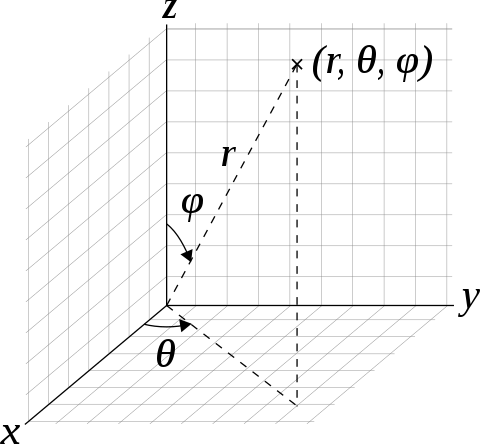
Initialization for the Polar scan, it expects either two or three vectors (for 3D). If two are given, the grid will be 2D (lateral / axial). Else case, the grid will also include the y coordinates (lateral / elevational / axial).
- Parameters:
rhos (np.ndarray) – The radial distances to the origin
phis (np.ndarray) – The polar angles (to the axial axis)
thetas (np.ndarray) – Optional, if provided, the azimuthal angles in the initial meridian plane
on_gpu (bool) – If set to False, the points will be stored in numpy arrays. Else case, cupy.array
- property axial_step
Returns the axial steps.
- build_pixels()
Builds the pixels coordinates. As we are working in a polar system, it first does the meshgrid of the rhos, phis and, if provided, thetas, then it is converting them to cartesian coordinates using a basic pol2cart method.
- Returns:
The pixels coordinates (xx, zz) in 2D or (xx, yy, zz) in 3D
- Return type:
tuple
- downsample_axial(factor)
Down-samples the scan in the axial direction by a factor.
- Parameters:
factor (int) – The factor for the down-sampling, will be rounded if not an integer
- fix_an_axis(axis, index)
If on 3D, defines a fixed axis for slice beamforming (especially for tri-plan or 2D visualization).
- Parameters:
axis (int) – The axis to fix, either 0, 1 or 2, for the x, y or z axes
index (int, float) – The index of the vector to fix
- property nb_x
Returns the lateral resolution (number of phis).
- property nb_y
Returns the elevational resolution (number of thetas) (None if 2D).
- property nb_z
Returns the axial resolution (number of rhos).
- oversample_axial(factor)
Over-samples the scan in the axial direction by a factor.
- Parameters:
factor (int) – The factor for the oversampling, will be rounded if not an integer
Reader class
- class ultraspy.io.reader.Reader(data_file, system='ultraspy', verbose=True)
Reader class to handle the data files from different ultrasound systems. After initialization, it has three attributes: the data itself, the data_info, and the probe class, which can be used directly in the Beamformer class. Check their getters to learn more about them. You also can call
Reader.available_systemsto have the list of the implemented ultrasound systems.Currently, the supported systems are:
ultraspy: reads data formatted for the ultraspy library
picmus: reads data issued from the PICMUS challenge ( creatis.insa-lyon.fr/Challenge/IEEE_IUS_2016)
must: reads the rotating disk data from MUST (biomecardio.com/MUST)
simus: data generated using the simulation tool SIMUS (biomecardio), contained RF and param
simu_3d: reads simulated 3d data from FieldII
dbsas: reads the data saved with the PA2 system of the company DB-SAS. It also works with the PAMini with some adaptations of the way it saves data
vera: reads data saved by the verasonics Vantage system, the saved workspace needs to have some specific variables (RcvData, Trans, Receive, Resource, PRF and P. It hasn’t been tested in many situations, so for now, you should assume it’ll only work on plane-waves emissions, with regular parameters
ulaop: reads data saved by the UlaOp system (from the MSD lab). This one is very high level and has been proven not to work in some situations (those should be checked some day). It should work fine on plane wave emissions (no focus) though.
- Variables:
available_systems (list) – The list of the available systems
data (dict) – The data, of shape (nb_frames, nb_plane_waves, nb_elements, nb_time_samples). The number of elements can be 1D or 2D when we are using a 3D probe
data_info (dict) – The information about the data
acquisition_info (dict) – The information about the acquisition setup
probe (dict) – The probe class
It initializes the Reader class, using a given data file, known for being recorded using a given system.
- Parameters:
data_file (str) – The path where to find the data
system (str) – The name of the system to use, default is the data formatted for this library
verbose (bool) – If True, we print a recap of the loaded data and of what has been extracted
- get_acquisition_info()
Returns the information related to the acquisition, which contains:
sampling_freq: in Hz
t0: in s
prf: in Hz
signal_duration: in s
delays: in m/s
sound_speed: in m/s
- Returns:
The information about the acquisition
- Return type:
dict
- get_data()
Returns the extracted data (of shape: (nb_frames, nb_transmissions, nb_elements, nb_time_samples))
- Returns:
The Numpy array with the ultrasound data
- Return type:
numpy.ndarray
- get_data_info()
Returns the information related to the data, which contains:
data_shape: tuple of int
data_type: the type of the data
is_iq: bool
- Returns:
The information about the data
- Return type:
dict
- get_probe()
Returns the probe class, which contains (mainly):
geometry: of shape (nb_dim, nb_elements)
central_freq: in Hz
bandwidth: in percentage
- Returns:
The information about the probe
- Return type:
Probe